---
title: "AsciiMath"
source: https://dev.pageseeder.com/reference/glossary/asciimath.html
description: "AsciiMath is an open-source project for creating MathML equations using simple plain text syntax in web browsers. PageSeeder supports it via media fragments and inline labels for rendering mathematical expressions."
last_updated: 2026-09-05T17:34:47+10:00
tokens: ~778
---
# AsciiMath
A free, open-source [project](https://asciimath.org/) that supports the creation of MathML equations using a simple, plain text syntax and a standard web browser.
It isn’t as comprehensive as [MathML](/reference/glossary/mathml.md) or [TeX](/_external/ps/doc/help/help/2_terms_and_explanations/term/tex.md), but it’s useful for data entry because symbols attempt to mimic in text what they look like rendered, like `oo` for ∞. It often results in more concise expressions.
AsciiMath can be used in [media fragments](/psml/elements/element_media-fragment.md) with the media type `text/asciimath` and [inline labels](/psml/elements/element_inline.md) `asciimath`.
*See also* [MathML](/reference/glossary/mathml.md).
## AsciiMath media fragment
To use a media fragment for ascii math, ensure that the media type is `text/asciimath`.
```xml
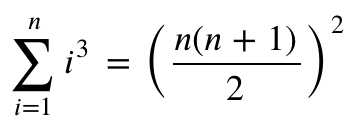
sum_(i=1)^n i^3=((n(n+1))/2)^2
```
PageSeeder can render your equation natively and displays the following in the browser:
If you need users to enter ascii math equations in media fragments, your [document template](/guide/configuration/psml/psml_document_template.md) must either have the media fragments predefined in the structure, or you need to define a [fragment template](/reference/glossary/fragment_template.md) like this in your `document-template.psml`:
```xml
Add an AsciiMath fragment
```
## AsciiMath inline label
PageSeeder also supports the use of specific asciimath inline labels to render asciimath expressions in your text content.
Using an inline label is convenient for shorter expressions that users want to display inline with their content, but they cannot be reused or transcluded. This is supported natively – managers only need to ensure that the `asciimath` label is defined in the [project labels](/reference/folders_and_files/project_template/label.md) so that it is available to end-users.
For example:
```xml
This formula f(x) = x^2 is an example.
```
Can be edited in PageSeeder as:

And renders as:

> **Warning:** If you publish your content outside of PageSeeder, ensure that your publish output can render your asciimath content. For example the PDF and DOCX export can render AsciiMath containing the letters “id” or “class” differently to the user interface. To avoid this always use “i d” or “cla ss” instead. So instead of the AsciiMath `(t_id_i"3")/(12)` use: `(t_i d_i"3")/(12)`.