---
title: "Hierarchical content patterns"
source: https://dev.pageseeder.com/guide/document_modeling/patterns/hierarchical_content_patterns.html
last_updated: 2026-08-07T17:09:54+10:00
tokens: ~1471
---
# Hierarchical content patterns
With the exception of topic-based documents, such as encyclopedias and dictionaries, publications that have evolved from paper are inherently hierarchical. Some generic classes of documents built with hierarchical structures include the following:
- **Report** – Title \> subtitle \> numbered heading level 1 \> numbered heading level 2 \> numbered paragraph \> numbered subparagraph
- **Book** – Title \> preface \> chapter title \> paragraph
- **Website** – Homepage \> top level menu \> 2nd level menu \> article \> image \> tags
There are two common hierarchical patterns that enable PageSeeder to support the preceding examples. They are:
- **Standalone** – uses a single [references](../../../reference/glossary/references_document.md) document to bind [component documents](../../../reference/glossary/component_document.md) into publications. These are suitable for a large number of use cases and publications.
- **Assembled** – uses multiple, nested references documents to create complex or very large publications.
While the patterns in this article feature the PageSeeder [document types](../../../reference/glossary/builtin_document_types.md), Default and References, they can be applied to other document types. The advantages of these patterns are:
- Straightforward to view and change the hierarchy.
- Straightforward to rearrange the content.
- Content can be reused by different hierarchies.
## Standalone hierarchy
This is useful for straightforward publications such as [monographs](https://en.wikipedia.org/wiki/Monograph) or hierarchal documents with the following:
- Only a few hundred pages of content or whatever size of document the formatter (for example, InDesign or Word) can comfortably process, and;
- An uncomplicated publication structure of one table of contents, one collection of end notes, a single glossary and index.
A suitable model could be the following—note that the recommended lengths are only for performance and usability:
- Split existing content or write new material into “component” documents (type=default), where each start with ``. The ideal document length is 2-20 pages.
- Split each document into fragments, ideally where a subordinate heading occurs, or each half page.
- Create a single document (type=references) to bind the components into a publication using an xref. Based on the level set on the xref, the headings in the component are adjusted appropriately. Starting each document with a level 1 heading, then using the xref to determine the hierarchical position means documents can be reused without authors having to mentally compensate for all future publishing scenarios.
- Use either an xref or directly enter the front matter into the first section of the references document. This is material that is normally published before the Table of Contents.
- The default for the xref editor in a references document is to create the xrefs with type=embed. However, developers must keep this in mind when creating a references document from markup.
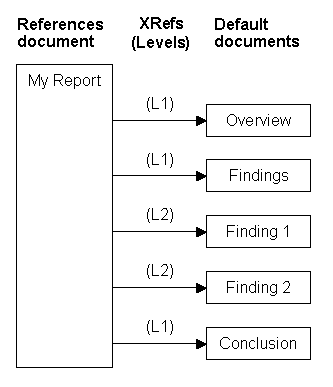
In the example above, each document title is a heading 1 (H1), but when the xref levels are processed, the heading levels are modified as follows:
- H1 – My Report
- H2 – Overview
- H2 – Findings
- H3 – Finding 1
- H3 – Finding 2
- H2 – Conclusion
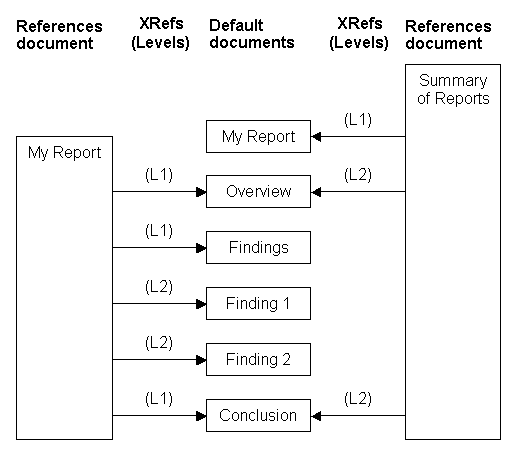
The example above shows how the same content can be reused in a different hierarchy and appear at different levels. When the second hierarchy is processed the heading levels would be modified as follows:
- H1 – Summary of Reports
- H2 – My Report
- H3 – Overview
- H3 – Conclusion
## Assembled hierarchy
An assembled hierarchy can be used for complex, large size hierarchies when:
- There is more than a few hundred pages of content or;
- Multiple table of contents, sets of end notes, glossaries or indexes are required or;
- Sets of content are to be reused by different hierarchies.
The data is modeled as follows:
- Content is split into *Default* documents up to a few pages long, ideally starting with a heading1.
- Each *Default* document is split into fragments up to half a page long, ideally starting with a heading.
- Multiple *References* documents contain up to a few hundred xrefs to *Default* documents with a level on each xref indicating the hierarchy.
- Place any front matter (not part of the table of contents) before the TOC location in the *References* document.
- One or more *References* documents contain xrefs to other *References* documents with a level on each xref indicating the hierarchy.
- Xrefs in *References* documents should be type `Embed`.
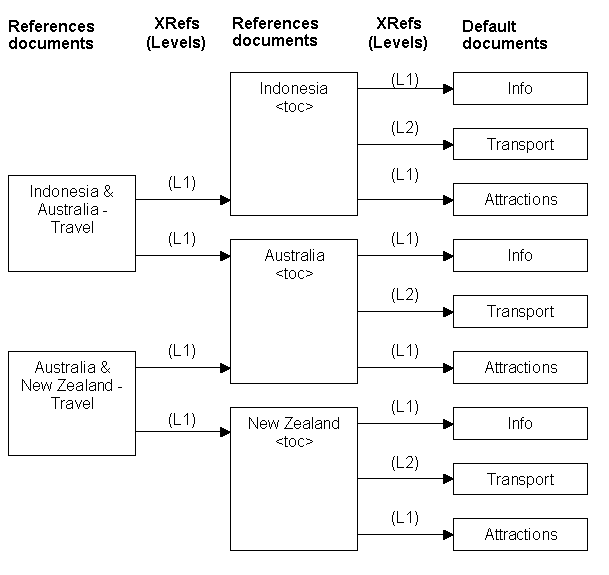
In the example above, each document title is a heading 1 (H1), but when the xref levels are processed, the heading levels are modified by adding together the heading level and the levels of all the parent xrefs as follows:
- H1 – Indonesia & Australia – Travel
- H2 – Indonesia
- Table of Contents
- H3 – Info
- H4 – Transport
- H3 – Attractions
- H2 – Australia
- Table of Contents
- H3 – Info
- H4 – Transport
- H3 – Attractions
Note that each country has its own table of contents (\). Also, if the Australia *References* document is processed by itself, the heading levels would be modified differently as follows:
- H1 – Australia
- Table of Contents
- H2 – Info
- H3 – Transport
- H2 – Attractions
Note that the Australia set of content is reused by two hierarchies: “Indonesia & Australia – Travel” and “Australia & New Zealand – Travel”.